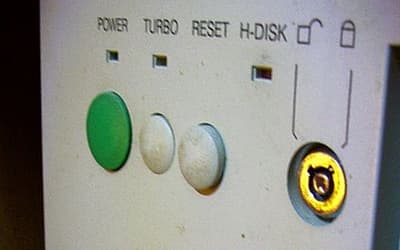
On the front of an old beige PC tower, the little button might sit beside the reset switch, below a tiny MHz display, with an amber light above it. The label said Turbo. A reasonable person expected the computer to leap forward. Sometimes the useful trick was to make the machine back off.
The Turbo button on many 1980s and 1990s IBM PC-compatible computers switched the machine between full speed and a reduced speed, often so older games and software could run correctly on faster processors.
The awkward number was 4.77 MHz. IBM’s original Personal Computer, released in 1981, used an Intel 8088 CPU running at that clock speed, and early PC software often assumed that kind of machine was the world it would live in.[4] Some programs used the CPU’s own speed as part of their timing. When newer hardware arrived, the processor did not simply finish chores faster. It could make the program’s clock run wrong.
Games made the problem easy to see. On a faster IBM PC-compatible machine, events could arrive too quickly, animations could race, and the time a player had to react could shrink until the game was effectively unplayable.[1] Other software could become unstable, crash, or misbehave when it ran on a processor much faster than the one its programmers had expected.[2]
The Fast Computers That Needed a Slow Switch
By the mid-1980s through the mid-1990s, IBM PC-compatible computers using Intel 80286, 80386, and 80486 processors commonly included a Turbo button on the case.[1] The switch selected between two run states: the machine’s normal fast mode and a reduced-speed mode closer to the older 8086 or 8088 era.[1] Turning off turbo mode slowed the system for compatibility with older software.[1]
The Eagle PC Turbo is often cited as an early example. Its switch let a user move between 8 MHz and 4.77 MHz operation, giving the faster machine a way to imitate the original IBM PC’s pace when needed.[2] The name came from the language of turbochargers, where “turbo” meant extra power and performance.[1] On the computer case, though, the memorable part was the opposite: speed had become something you sometimes had to remove.
The button itself did not always behave the same way. On most systems, turbo mode was active when the button was pushed in, but the wiring could be reversed, so some computers worked the other way around.[1] A user might check the front-panel LED or the two-digit segmented MHz display for a clue. Even those displays could be misleading. In some cases, the numbers were not live measurements of the processor clock, but preset fast and slow values chosen with motherboard jumpers.[1]
Some machines added smaller rituals. Certain Packard Bell 486ES systems could switch modes with Ctrl-Alt-+ and Ctrl-Alt--, and models without a dedicated Turbo button still used the power light as a signal: green for normal Turbo mode, orange for Slow mode.[1] A few keyboards had their own Turbo button near the right Shift key, but that one did not change the CPU clock. It changed the keyboard repeat rate.[1]
Why the Button Disappeared
As PCs kept changing, programmers stopped treating one processor speed as a safe stopwatch. Software began using better timing methods and built-in delays so it could survive faster and more varied hardware.[3] The front-panel switch became less necessary because newer programs no longer depended so heavily on a fixed CPU clock to pace their behavior.
By the mid-1990s, Turbo buttons were disappearing from prebuilt PCs and computer cases, and by the 2000s they had nearly vanished.[3] What remains is the odd memory of a promise printed on plastic: Turbo, glowing beside a little display, waiting for the user who needed the fast computer to slow down.
Sources
- Turbo button, Wikipedia
- What Was The Turbo Button On Old '90s PC For & Why Don't We Have It Anymore?, SlashGear
- Why Did Old PCs Have A Turbo Button On Them?, BGR
- Why Did the Turbo Button Slow Down Your PC in the '90s?, How-To Geek
- That “Turbo” button on old PCs? It actually slowed things down, Dixie Sun News